New & Improved Bill Pay: Stay on Top of Your Payments with Ease
Exciting Updates to Your Prospera Bill Pay Experience
We’re always looking for ways to make managing your money easier, clearer, and more convenient. That’s why we’re excited to share several updates to Bill Pay that are now available in your digital banking experience. These enhancements give you faster insight into your accounts, greater transparency, and a smoother way to stay on top of your payments.
A Smarter, More Helpful Accounts Widget
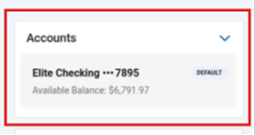
A brand-new Accounts widget now displays your default funding account front and center. From there, you can easily expand to view your full list of available funding accounts, each showing both the account name and its available balance.
This makes it easy to confirm you have sufficient funds before making a payment, helping you stay confident and in control at every step.

Clearer Insight into Upcoming & Recent Payments
A redesigned Bill Pay Activity Summary widget provides an at-a-glance view of all activities related to your payments. You can even click on any payment in the list to jump directly to that biller’s Payment Activity page.
Here’s what you’ll see:
- Past Due Bills – Displays only when you have any past-due eBills.
- Due Bills – Always visible for eBills that are due, with the ability to make payments right from this section.
- Scheduled – Shows all payments scheduled within the next 45 days.
- Paid – Lists payments processed within the last 30 days.
- Pending – Appears when you have payments still in progress.
- Failed – Appears only when a payment has not been successfully processed.
More Transparency with AutoPay
We’ve also made AutoPay easier to understand and manage:
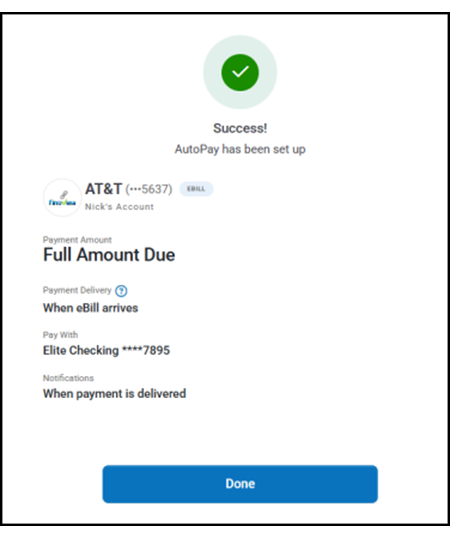
- A new AutoPay Confirmation Screen now appears when you set up AutoPay for a biller. This screen outlines the details, so you know exactly what to expect.
- For credit card billers, the “Amount to Pay” field now defaults to the Minimum Amount Due. You can still choose “Full Amount Due” or enter a custom amount.